Gears of War: E-Day Open Beta Details & FAQ
The Gears of War: E-Day Open Beta is your chance to get hands on with Gears of War: E-Day and provide essential feedback to help ensure the best Day One experience possible when the game launches on October 6.
- Early Access runs from August 6th – August 10th
- Open Beta access is available for all players from August 13th – August 17th
Open Beta Times & Content
Early Access to the Beta is available to players who have pre-ordered the game across XBOX Series X|S, Steam and/or Game Pass Ultimate or PC Game Pass Members. It begins on August 6 at 12 pm PT and ends on August 10 at 10am PT.
The second weekend is open to all players on all eligible platforms, regardless of their pre-order status. The second weekend is scheduled to begin on August 13 at 12pm PT and end on August 17 at 10am PT.
Beta content will be the same each weekend. Players in the Early Access period will be the first to experience the evolution of Gears’ iconic PVE mode – Horde Siege – and our refined 4v4 Versus for competitive play.
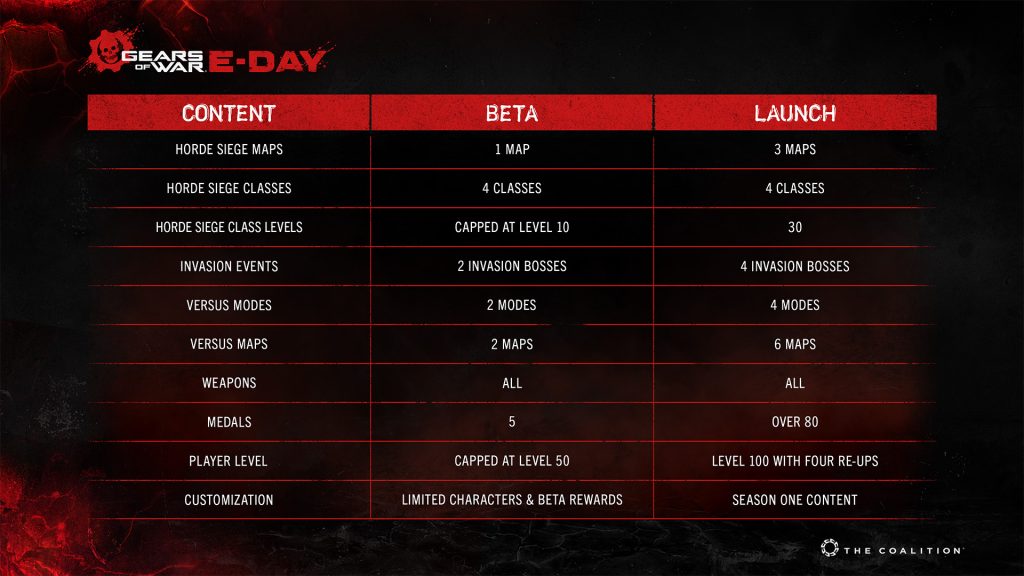
Beta content features only a subset of launch content. To see the difference between what’s available in the Beta and what’s available at launch see below.
Open Beta Exclusive Rewards
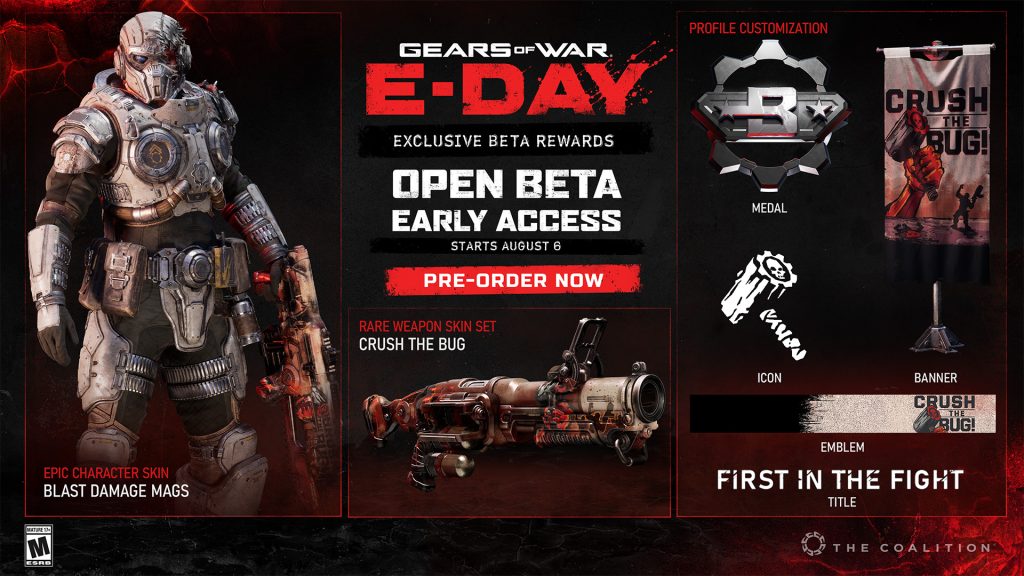
To thank you for playing the Open Beta, we’re giving you rewards! Might seem obvious, but you must play the Beta to obtain these. As you complete challenges, these rewards will unlock for use in the Open Beta and later be in your inventory at launch.
- Epic Blast Damage Mags Character Skin – Hit Player Level 20
- Rare Crush the Bug Weapon Skin Set – Extract from Horde Siege 8 Times on Infantry difficulty or higher.
- Crush the Bug Banner – Get 25 Headshots
- Crush the Bug Emblem – Perform 10 Revives
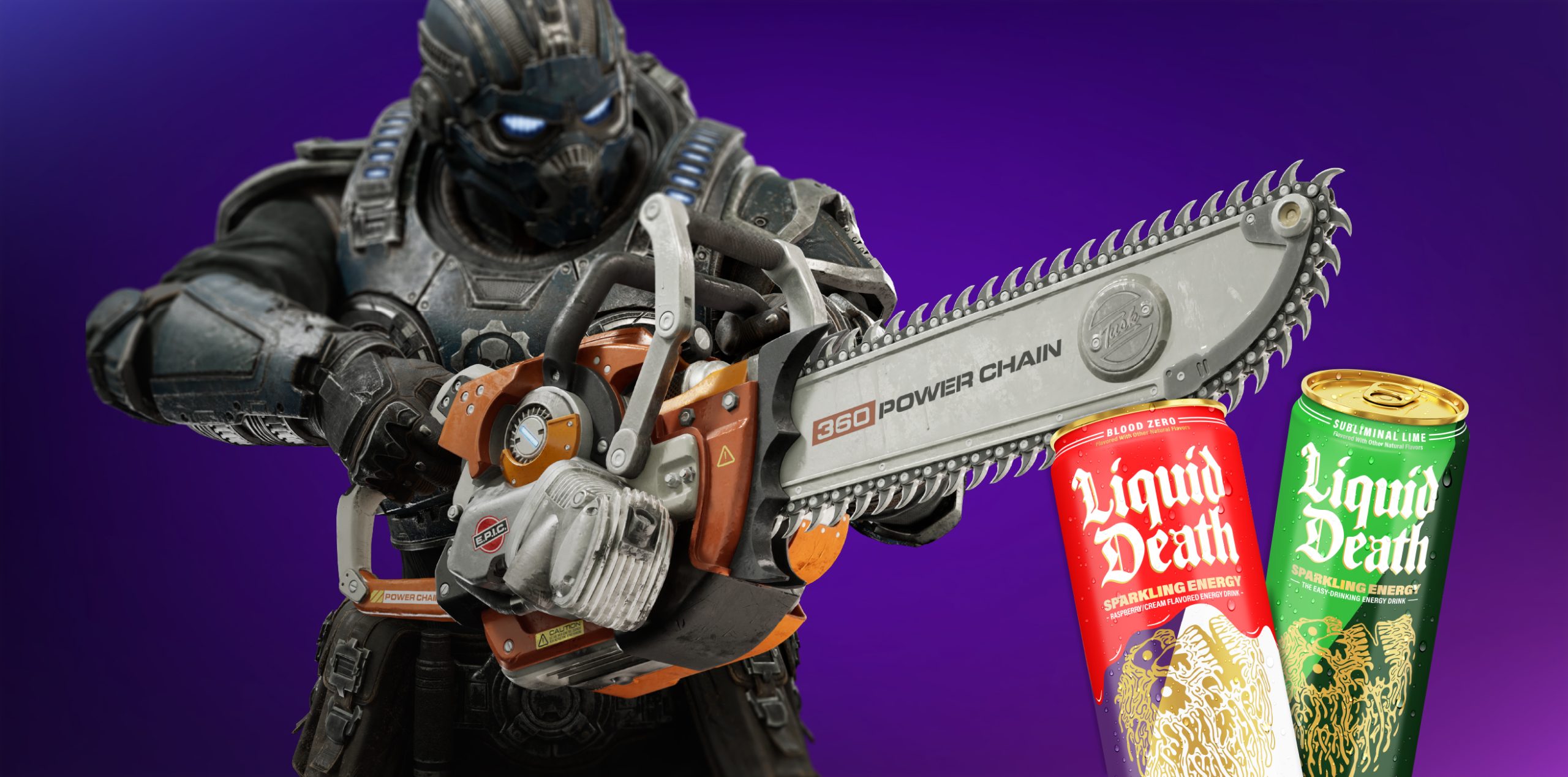
- Crush the Bug Icon – Perform 5 Prototype Lancer Chainsaw Executions
- Open Beta Medal & First in the Fight Title – Launch the Multiplayer Beta
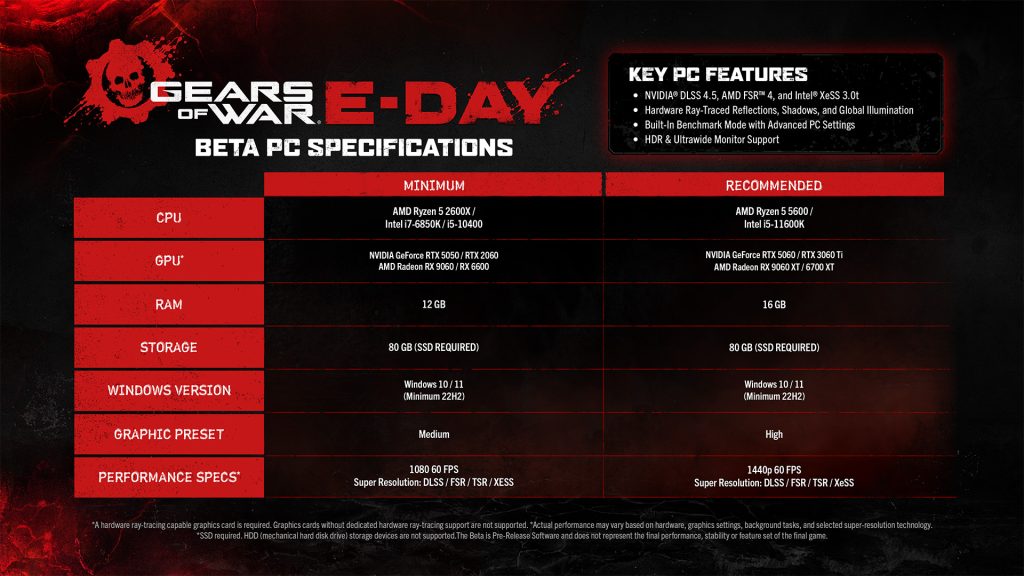
Open Beta PC Specs
Playing on PC? Ensure you’re ready to go with our recommended BETA specs for PCs. Please note: These are not our launch specifications. We will update with final specifications ahead of the launch date.
How you download the Gears of War: E-Day Multiplayer Beta client depends on where you placed your pre-order:
- XBOX (Digital): By pre-ordering on XBOX or through the XBOX for PC App, starting today, the Beta client should automatically appear for download under “My Games and Apps” on Xbox or “My Library” in the PC App for you to download. If you don’t see it, try searching for “Gears Beta” in the Store.
- Game Pass Ultimate or PC Game Pass Member: Early Access to the Open Beta is included as a part of your Game Pass Membership. Simply search for “Gears Beta” in Game Pass and download the client.
- XBOX (Physical & Collector’s Edition): If you pre-ordered a physical version of Gears of War: E-Day, you should have received an email from the retailer you purchased the game from. For the Collector’s Edition, regardless of whether you ordered on XBOX or Steam, a code should have been emailed to you. If you have not received a code, please check your spam folder. Still no code? We suggest you reach out to the XBOX Game Studios Shop Customer Service before reaching out to Gears Community for assistance.
US Customer Service
EU Customer Service
Once you receive a code, redeem at xbox.com/redeem. - Steam (Digital): Starting today, the Beta client should be automatically added to your Steam Library as a part of your pre-order.
- All Platforms: the Beta client will be available for players to download across all platforms; no pre-order required. Simply search for the ”Gears Beta” on XBOX, the XBOX for PC App, or Steam and download accordingly.
A reminder to PC players to ensure the best experience:
SSD Required: HDDs (slower mechanical drives) are not supported and may cause severe loading issues, missing assets, stuttering, and crashes.
Update your drivers: please ensure all NVIDIA, AMD or Intel drivers are updated and the game is installed on a SSD. Recommended drivers are:
- AMD: 26.7.1
- NVIDIA: 610.74 or newer
- Intel: 101.8864
August 12 Fixes and Improvements:
- Prototype Lancer – Increased base damage and reduced perfect reload damage.
- Hit Detection Delays – Improved hit detection delays players were experiencing in Horde Siege.
- Stability – Improved stability and reduced frequency of crashes across all platforms.
- Connection Timeouts – Implemented mitigations to address connection timeout errors.
- Matchmaking Improvements– Made further improvements to our Matchmaking system in Versus (Social & Ranked)
- Drone-Snub Error Code – Implemented mitigations for the drone-snub error code. As part of this change, we have updated our port requirement from UDP 443 to UDP 3074. If you continue to experience this issue, please ensure the required ports are open on your network. For more information, visit Xbox Live Network Ports
- Anti-cheat protection – Improved anti-cheat protection and took enforcement action against verified cheaters.
- Third-Party Controller Support – Improved an issue where some third-party controllers were not recognized upon game launch on Steam.
- Account Linking – Improved issue where players were not able to link their Microsoft accounts.
- Xbox Series S – Made further improvements to reduce hitching on Xbox Series S.
No. You do not need Game Pass to play in Weekend 2 of the Open Beta. At launch, multiplayer access will require a Game Pass Essential membership or higher.
No. An XBOX / Microsoft account is not required to play on Steam. However, if you want to send a cross-platform squad invite, you will need to link an XBOX account to do so.
From the main menu, open the social pane and look in the upper-left hand corner of your screen for a “Link Account” button. Select this option and follow the sign-in flow.
- The Beta Player Title and Beta Medal as well as any Beta Challenge rewards you unlock will be available for use at launch.
- However, your Class progression, Player Level and other Medal progress will not carry over to launch and will be reset.
Yes. Your challenge & Medal progress, rewards, Class progression and Player Level all carry over to the Open Weekend.
- Get in touch! Submit a ticket through our support site here: https://aka.ms/gearscontactsupport.
- Be sure to share as much detail as you can regarding your issue or feedback and include screenshots where possible
- NOTE: If your problem is captured in the Known Issues list below, there is no need to submit a ticket.
For the best online experience, we recommend connecting your Xbox using a wired Ethernet connection whenever possible. Wired connections typically provide more consistent latency, lower packet loss, and fewer disconnects than Wi‑Fi. If you are troubleshooting multiplayer, voice chat, streaming, or connection-quality issues, please test using a wired connection before investigating other network settings.
For more help visit Xbox Support
For the latest on BETA support, please follow @GearsofWar on X, Instagram, Facebook and Discord.
Please remember, the Beta is not a final product.
- Stability and Performance is still a work in progress, and you can expect crashes and performance dips.
- Accessibility features, particularly narrator, are still being debugged and refined.
- World issues such as cover issues, visual popping/streaming issues and out of bounds issues may be visible.
PC Known Issues
NVIDIA users should update to GeForce Game Ready Driver 610.74 or newer before launching. The game will not launch on older NVIDIA drivers until updated.
Older drivers will not be supported. You must have the following driver versions or later:
- AMD – 26.7.1
- Intel – 101.8864
- NVIDIA: 610.74 or newer
Recording with older versions of OBS will cause the game to crash. Please ensure you are running v29.0.0+
Intel Arc graphics cards currently recompile shaders on every game launch, resulting in longer start-up times.
Intel Arc A580 and B580 graphics cards may experience significantly reduced performance if Resizable BAR (ReBAR) is disabled in BIOS. If you are experiencing poor performance, verify that ReBAR and Above 4G Decoding are enabled. Consult your motherboard or system manufacturers or system manufacturer’s documentation for instructions.
Players using third-party anti-virus software like Norton and/or Comodo Antivirus may be unable to launch the game because they can incorrectly block game executables. If the game fails to launch, temporarily disable your antivirus or configure it to allow the game executables to run before launching the game.
Being signed into the XBOX App with one account and the Windows Store with another account can block your ability to play online.
Account linking on Steam Machines does not work.
Frame generation is disabled. This is temporary and will be enabled in the final game.
Framerate is capped at 150 FPS. This is a temporary cap that will not exist in the final game.
When switching display modes, sometimes the game will not fill the entire display.
Aim Assist – Missing clarification in Settings that Aim Assist only affects Campaign and Horde Siege game modes. Versus will not be affected.
Intel users should update the Intel BIOS.
Steam Account Linking Issues:
- Use the Gaming Services Repair Tool here: Gaming Services Repair Tool for PC | XBOX Support
- Ensure you’re signed-in to your desired gamertag in the XBOX for PC app.
Failure to Launch – LowLevelFatalError:
- Error triggered for XBOX for PC App users; use the Gaming Services Repair Tool here: Gaming Services Repair Tool for PC | XBOX Support
Controllers Not Recognized on Steam:
- Known issue we’re investigating.
- Some users have reported success by unplugging mouse and keyboard USB connections as well as ensuring that the controller you want to use is plugged in or connected when you launch the title.
XBOX Series X | S Known Issues
On Xbox Series S, some players may encounter hitching after extending Horde Siege play sessions when using Quality Mode.
- Workaround: If hitching occurs, fully quit and restart the game. This restores normal performance for the next play session.
Please update to GeForce Game Ready Driver 610.74 before launching. The game will not launch on other NVIDIA drivers until updated.
- Stability and Performance is still a work in progress; you may experience performance dips and/or crashes.
- Accessibility features such as menu narration are still being refined, you may notice issues.
- World gameplay issues such as problems with cover, visual popping, streaming and out of bounds issues may be visible.
- Death camera and executions have known bugs and may result in jittering or unexpected camera angles.
drone-snub:
- Implemented mitigations for the drone-snub error code. As part of this change, we have updated our port requirement from UDP 443 to UDP 3074. If you continue to experience this issue, please ensure the required ports are open on your network. For more information, visit Xbox Live Network Ports
quentin-ephyra:
- Authentication error related to XBOX Quick Resume; disable Quick Resume from your XBOX system settings.
bryce-vigil or gill-gutpuncher:
- Error caused by a discrepancy between a players’ hardware date & time settings and local time.
- In Windows, use the “Sync Now” function in Date & Time settings to align your system time to local time.